 Get a quote →
How to Set Up a Video Podcast at Home or in the Office: A Practical Checklist
The room, the sound, the cameras and the light, in the order that actually matters. From a crew that sets up podcasts in homes and offices.
 By Mohamed Hesham, Founder of CEMA · LinkedIn
Updated 11 Oct 2026 · 6 min read
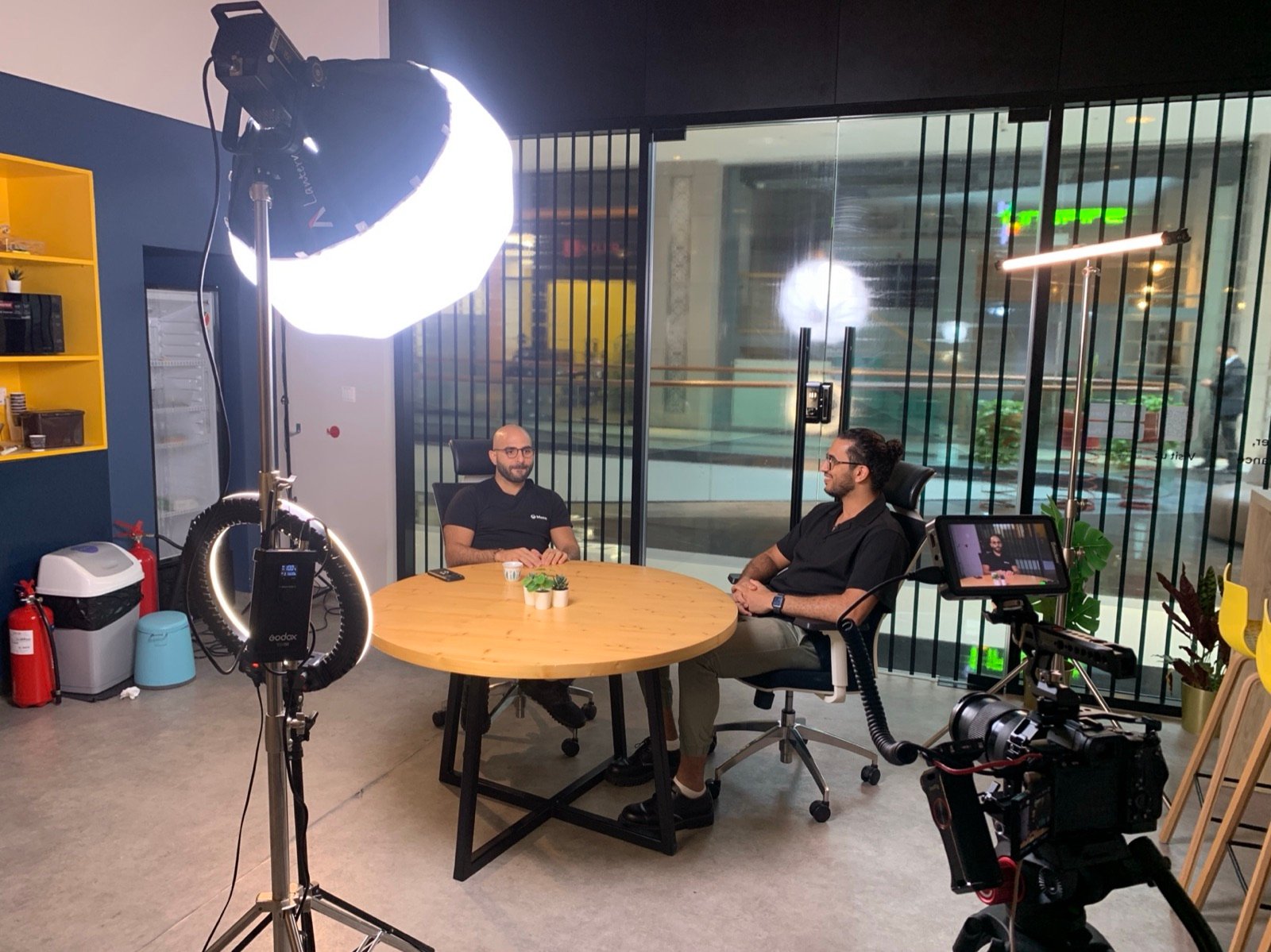
Short answer: a good video podcast at home or in the office needs four things, in this order: a quiet room, a microphone close to each speaker, two or three cameras at eye level, and soft light on faces with the background kept darker. Viewers forgive an average picture, but they leave when the sound is bad. Get the room and the microphones right first, then spend on cameras and lights.
1. Choose the room before you choose the gear
- Quiet beats pretty. Listen for the air conditioning, the fridge, the lift and the road. If you can hear it, the microphone can too. Turn off what you can for the recording.
- Soft surfaces help. Carpets, curtains, sofas and bookshelves soak up echo. An empty glass meeting room is the hardest place to record.
- Leave depth behind you. Sit at least a metre or two away from the wall, so the background falls out of focus and the picture looks deeper.
- Control the windows. Daylight changes during a long recording. Close the blinds, or sit so the window is to the side, never behind you.
2. Sound: one microphone per person, close to the mouth
- Give every speaker their own microphone. One shared microphone in the middle of the table always sounds distant.
- Keep it close. A hand’s width from the mouth is a good start for a podcast microphone. Distance is what makes a room sound echoey.
- Record each voice on its own track. A mixer or recorder that keeps voices separate lets the editor fix one person without ruining the others.
- Wear headphones for the first minute. Listen to a test before you start. Most ruined episodes had a problem you could hear in the first 30 seconds.
- Wireless clip-on microphones are the easy option for guests who move around or don’t want a microphone in front of their face.
3. Cameras: two or three angles at eye level
- One camera per speaker, plus a wide shot. Cutting between angles keeps a long conversation watchable and lets the editor hide pauses and mistakes.
- Eye level, not table level. A camera looking up at someone is unflattering. Raise it to the eye line.
- Match the settings. Set the same frame rate, colour profile and white balance on every camera, or the angles won’t match in the edit.
- Lock focus and exposure. Auto settings drift during a long take.
- Check storage and power. A one-hour episode on three cameras fills cards quickly. Use mains power, not batteries.
4. Lighting: soft light on faces, darker behind
- One large soft light per speaker, slightly to the side and above eye level, does most of the work.
- Turn off the ceiling lights. Office downlights put shadows under the eyes and mix colours with your own lights.
- Separate people from the background with a small light behind them or a lamp in the shot.
- Keep the background a little darker than the faces. It’s the quickest way to make a normal room look like a set.
5. The recording routine
- Phones on silent, notifications off on any laptop in the room.
- Start every camera and the audio recorder, then clap once on camera. The clap makes it easy to line up sound and picture in the edit.
- Record 30 seconds and play it back: sound, focus, framing.
- Keep water within reach and a printed list of talking points out of shot.
- If something goes wrong, pause, say what happened out loud, and repeat the last sentence. The editor will thank you.
- Back up the cards to two places before anyone leaves the room.
6. Plan for clips while you record
Most podcasts grow through short vertical clips, not through the full episode. Frame each speaker so a vertical crop still works, ask guests to answer in complete sentences, and note the time whenever someone says something quotable. Recording several episodes in one session also saves hours of set-up: one morning can produce a month of episodes.
The mistakes we see most
- A beautiful picture with echoey sound from a microphone that is too far away.
- A bright window behind the host, which turns them into a silhouette.
- Cameras with different colour settings, so each angle looks like a different show.
- One long take with no backup, lost to a full memory card.
- Recording one episode at a time, and giving up after three because the set-up takes too long.
When to bring in a crew
Doing it yourself makes sense while you’re finding the format. Once the show represents your company, or involves guests whose time matters, the set-up, sound and edit are better handled by people who do it for a living. With podcast production at your home or office, our crew of two brings 2 to 3 cameras, lighting, a mixer and microphones for up to four people, records several episodes in one visit, and delivers edited episodes and clips. A half-day recording starts from AED 3,000.
Frequently asked questions
What equipment do I need for a video podcast?
A microphone for each speaker, a mixer or recorder that keeps each voice on its own track, two or three cameras, one soft light per person, and headphones for checking sound.
Is sound or video more important for a podcast?
Sound. Viewers tolerate an average picture but stop watching when voices are echoey or hard to hear. Fix the room and the microphones before upgrading cameras.
How many cameras does a podcast need?
Two is the practical minimum for a two-person show, and three is better: one on each speaker and a wide shot. More angles make a long conversation easier to watch and to edit.
Can I record a podcast in a normal office?
Yes, if the room is quiet. Soft furnishings reduce echo, and good lighting with a darker background makes a normal office look like a set.
Comparing options? Read podcast studio or your own office: what it costs in Dubai.
Rather have it set up for you?
We bring the cameras, lights, microphones and crew to your home or office, and deliver edited episodes and clips. Half-day recordings from AED 3,000.
Keep reading
Podcast production at your home or office
We bring cameras, lighting, microphones and a crew to you.
See the service → PricesPodcast studio or your own office? What it costs in Dubai
Published studio prices compared with a crew at your place.
Read → ServiceContent creation in Dubai
A month of reels and videos from one shoot day.
See the service →